AI muscle video from one photo, made to keep the same face.
Upload one photo, press one button and get an AI muscle video as an MP4: the shoulders, arms and chest swell into a muscular build while the face, outfit and background stay the same. Writing is optional, the muscle transformation is built in.
Sign in with Google or Apple and your AI muscle video starts rendering right away. Your first video is free.
AI muscle video in one click · First video free · Failed runs refunded
AI muscle video examples, one click each.
Each AI muscle video here began as a single photo. We uploaded each picture and pressed one button: the built-in muscle transformation, no prompt, no editing, no second try. The model and length sit under each clip.
 Before
A smiling man in a red sweater with his arms crossed
The built-in muscle transformation, nothing written
Kling O3 · 5 s
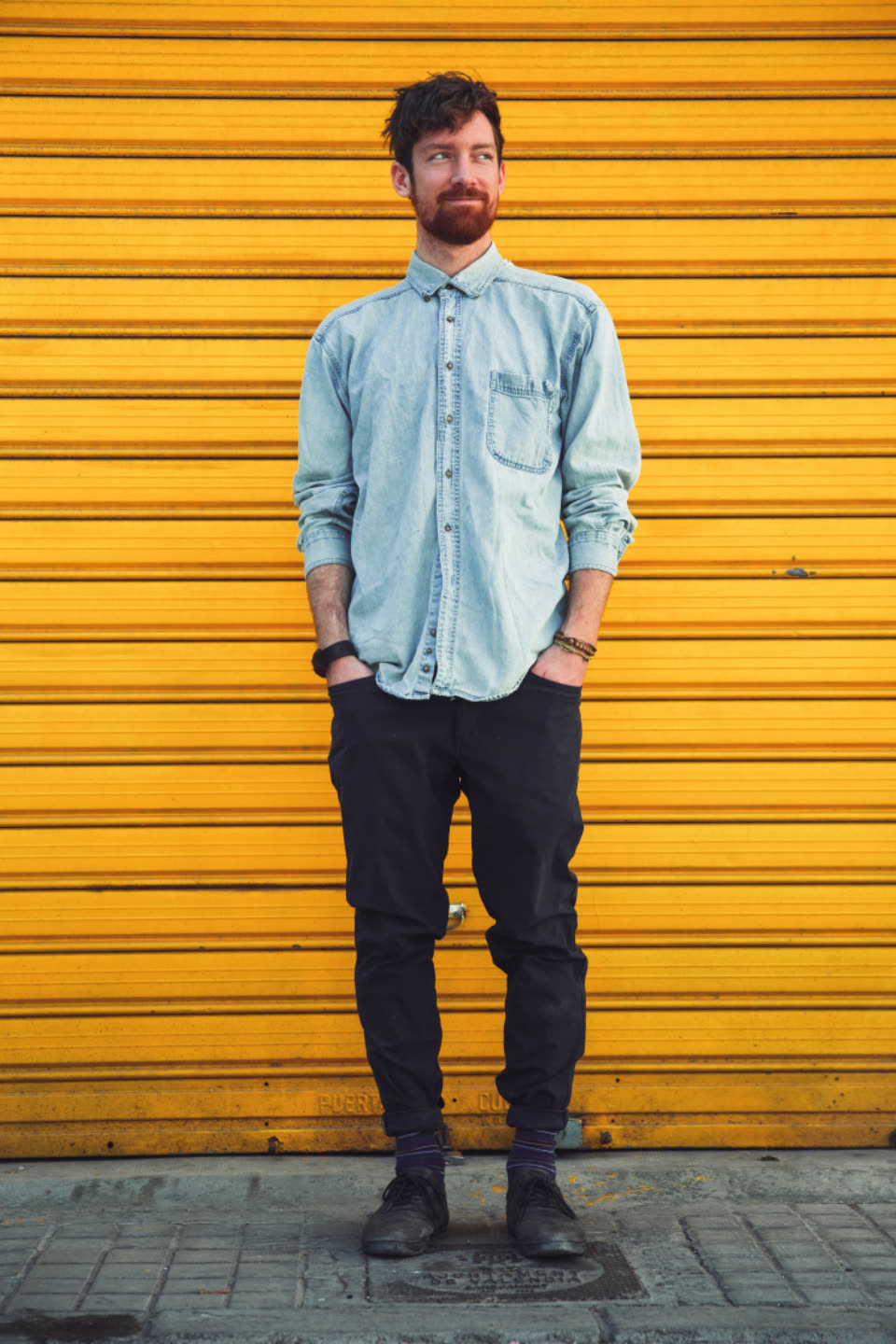 Before
A slim man in a denim shirt against a yellow shutter
The built-in muscle transformation, nothing written
Kling O3 · 5 s
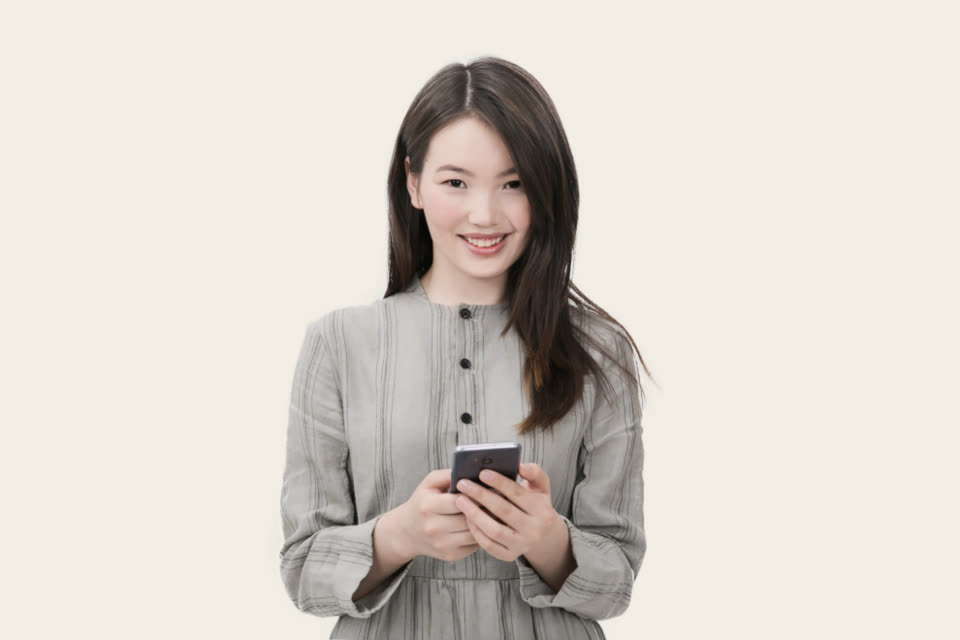 Before
A smiling woman in a grey dress holding her phone
The built-in muscle transformation, nothing written
Kling O3 · 5 s
AI muscle video at a glance.
Stivio is a browser-based AI muscle video generator: one photo in, a short MP4 of the person bulking up out. The facts, in one place.
- Input
- One photo for each AI muscle video: JPEG, PNG or WebP, up to 10 MB. A waist-up or full-body photo of one person works best.
- Output
- An MP4 of 3 to 30 seconds, depending on the model, in the same shape as your photo: square, vertical or wide.
- Motion
- Built in: the shoulders broaden, the arms and chest swell and the person ends with a muscular build, clothes on. Or describe your own AI muscle video motion.
- Models
- Kling O3, Seedance 2.5, Seedance 2.0, Wan 2.6, MiniMax H3 and Kling 2.6. The one-click button makes a 5-second AI muscle video on Kling O3 at 720p.
- Time
- Usually 1 to 5 minutes per AI muscle video. Failed renders are refunded automatically.
- Price
- A 5-second Kling O3 720p clip costs 10 credits. One-time packs: $19 for 160 credits or $59 for 640, and credits never expire.
- Free trial
- New accounts get 10 free credits (one free trial per person), enough for one AI muscle video with a watermark.
- Rights
- Terms section 10.2 lets you use your AI muscle video clips for personal and commercial purposes; you are responsible for the photos you upload. After any purchase, new videos have no watermark.
How to make an AI muscle video in three steps.
No app to install, no editing and no prompt writing. An AI muscle video here takes one photo and a couple of minutes, all in your browser.
- 01
Upload a photo for the AI muscle video
Pick a sharp photo of one person, ideally from the waist up, with the arms and shoulders in view. The AI muscle video keeps the photo's shape, so a vertical phone photo gives a vertical video for Reels and TikTok.
- 02
Press Make my muscle video
The AI muscle video motion is already written for you: the shoulders broaden, the arms and chest grow and the person ends up visibly broader and bulkier. Want a flex or a pose? Type it in the optional box.
- 03
Download the AI muscle video
Your AI muscle video is usually ready in 1 to 5 minutes. Save the MP4 and post it as a Reel, a Short or a TikTok, or send it to the friend who just started going to the gym.
Tips for a better AI muscle video.
The AI starts from your photo, so the picture you pick decides most of the result. These habits make every AI muscle video look more convincing.
Show the arms and shoulders
The AI muscle video grows what it can see. A waist-up or full-body photo with the arms visible gives a much bigger transformation than a tight face close-up.
Fitted clothes stretch better
T-shirts, sweaters and tank tops show the muscles pushing through. A thick coat hides the body, so the AI muscle video has less to work with.
Use a sharp, well-lit photo
Daylight and a clear face give the cleanest AI muscle video. Dark or blurry photos make the AI guess, and guessing is where faces start to change.
One person per photo works best
With one clear subject, the AI muscle video knows exactly who should bulk up. In group photos, the wrong person may grow, or nobody does.
Write one clear AI muscle video prompt
If you write your own AI muscle video prompt, keep it to one idea: "he flexes both biceps as his arms grow huge", "she turns into a fitness model with toned arms", "his chest and shoulders double in size".
Try a second model if a take looks off
Different models handle big body changes differently. If one AI muscle video take changes the face or barely grows, run the same photo on another model in the Studio.
What people make with an AI muscle video.
An AI muscle video is a few seconds long and gets a reaction, which is why it is all over short-video feeds.
AI muscle video for Reels, Shorts and TikTok
Start from a vertical photo and your AI muscle video is ready to post. A skinny-to-bulky transformation in five seconds is an easy, funny clip.
Pranks and birthday surprises
Turn a friend's photo into an AI muscle video for a group chat, a birthday or a gym-day joke. Ask them first before you post it publicly.
Gym motivation
Some people make an AI muscle video of themselves as a goal picture. It is an AI effect, not a prediction, so treat it as fun, not a promise.
Creators and memes
Use an AI muscle video in a meme, an intro or a reaction video. Paid videos carry no watermark, and Terms section 10.2 allows commercial use. Never present it as real fitness results.
AI muscle video: your questions.
What people usually ask before they make an AI muscle video with Stivio.
How do I make an AI muscle video?
Upload a photo on this page and press Make my muscle video. The muscle transformation is built in, so you don't have to write anything. The AI renders a short MP4 in about 1 to 5 minutes. Sign-in with Google or Apple is required before the video renders.
Is there an AI muscle video generator free?
Yes. New accounts get 10 free credits (one free trial per person), enough for your first AI muscle video. Free videos carry a stivio.ai watermark across the middle of the frame; any one-time pack or plan removes it from every later video.
Will the face stay the same in the AI muscle video?
The photo is the first frame, and the built-in motion tells the AI to keep the face, hair, skin tone, clothes and background unchanged while only the body grows. Clear photos usually hold up well. It is AI video, so check the result before you post it; if a take looks off, run it again or try another model.
What is the best AI muscle video generator?
It depends on what you want. If you want a photo of a real person to bulk up in a short video, Stivio does that in one click and lets you switch between six video models in the Studio. If you want a still muscle photo or a live camera filter, a photo editor or filter app fits better, since Stivio only makes videos.
How much does an AI muscle video cost?
A 5-second Kling O3 clip at 720p costs 10 credits. With the one-time packs ($19 for 160 credits, $59 for 640) that is about $1.19 or $0.92 per AI muscle video, and the credits never expire. Longer clips, higher resolutions and other models cost more per second; the Studio shows the cost of every setting. Your first AI muscle video is free.
Which AI model is best for an AI muscle video?
Kling O3 keeps faces steady and is one of the lowest-priced models per second, which is why the one-click button uses it. Seedance 2.5 handles longer clips, up to 30 seconds, if you want a slower transformation. You can switch on sound in the Studio for Kling O3, Kling 2.6 and the Seedance models.
Is this an AI muscle generator from image?
Yes. Stivio is an AI muscle generator from image to video: you upload one picture and get a moving clip of the person growing muscles. It does not make a still muscle photo; if you only want a picture, take a frame from the video.
What is a good AI muscle video prompt?
The built-in prompt already does a full transformation. To write your own, describe one change in plain words, for example "his arms and shoulders grow huge as he flexes", "she becomes a toned fitness model" or "he slowly turns into a bodybuilder and smiles". Keep it about the person already in the photo.
Does the AI muscle video work on women?
Yes. Upload any adult's photo; the built-in motion grows the shoulders, arms and chest. For a lighter, toned look rather than a bulky build, write it in the box, for example "she becomes athletic and toned".
Can I make an AI muscle video with no watermark?
Yes. Free trial videos carry a stivio.ai watermark across the middle of the frame. After any purchase, a one-time pack or a plan, every new AI muscle video you make is clean.
Is the AI muscle video a real body prediction?
No. It is an AI effect for fun. It doesn't know your training, diet or genetics and doesn't show how you would really look. Never use an AI muscle video as a before-and-after result to sell a program or supplement.
Can I add the AI muscle video effect to an existing video?
No. Stivio starts from a photo, not a video, and it is not a video editor or a live camera filter. Take a still from your video, upload it, and the AI makes a new clip from it.
Is there an AI muscle video app?
You don't need an app: the AI muscle video generator runs in your phone or desktop browser. Open this page on your phone, upload a photo from your camera roll, sign in and save the finished MP4.
Can I make an AI muscle video for TikTok?
Yes. The video follows your photo's shape, so a vertical 9:16 photo gives a vertical AI muscle video, a square photo gives a square one and a wide photo gives a wide one.
Do the clothes come off in the AI muscle video?
No. The built-in prompt keeps the clothes on and lets them stretch tight over the new muscles. Prompts asking for nudity are blocked.
Can I make an AI muscle video of someone else?
Only with their permission. Upload photos you took or have the right to use, and ask the person before you post an AI muscle video of them. Don't use it to embarrass anyone or make them look like something happened that didn't.
How long does an AI muscle video take?
Usually 1 to 5 minutes for each AI muscle video. You can keep the page open to watch it land, or find it later in your history.
Are the photos I upload for an AI muscle video kept private?
They are never listed publicly. Videos are unlisted: only people you send the link to can open them, and they are kept out of search engines. Stivio never uses your uploads to train its own models and never sells them or shares them for advertising. Your photo goes only to the services that check, render and store it, listed in Privacy Policy section 7. Anyone you send a video link to can also see the original photo.
More ways to make videos from photos
AI muscle video from one photo.
Upload a photo, press one button and get your AI muscle video in a few minutes. Sign in with Google or Apple, first video free (one trial per person), no card needed.