Seedance 2.0 in your browser, one click.
Upload a photo, press one button and Seedance 2.0 turns it into a 720p video with AI sound. There is nothing to install and nothing to write: our built-in Seedance 2.0 prompt asks for natural movement, a slow camera push-in and ambient sound that fits the scene, and tells the model to keep faces, objects and the background unchanged.
Sign in with Google or Apple. A 4-second Seedance 2.0 clip at 720p costs 20 credits. It starts right away if your balance covers it; otherwise the Studio opens with Seedance 2.0 set up, so you can add credits and press Generate. The 12 free credits on a new account are not enough for this model.
Seedance 2.0 in one click · Sound included · 720p and 1080p
Seedance 2.0 examples, one click each.
Every clip here was rendered by Seedance 2.0 on this site. We uploaded each photo and pressed the button with the built-in prompt: nothing written, no editing, no second try. The clips play muted on this page; the MP4 you download carries the sound.
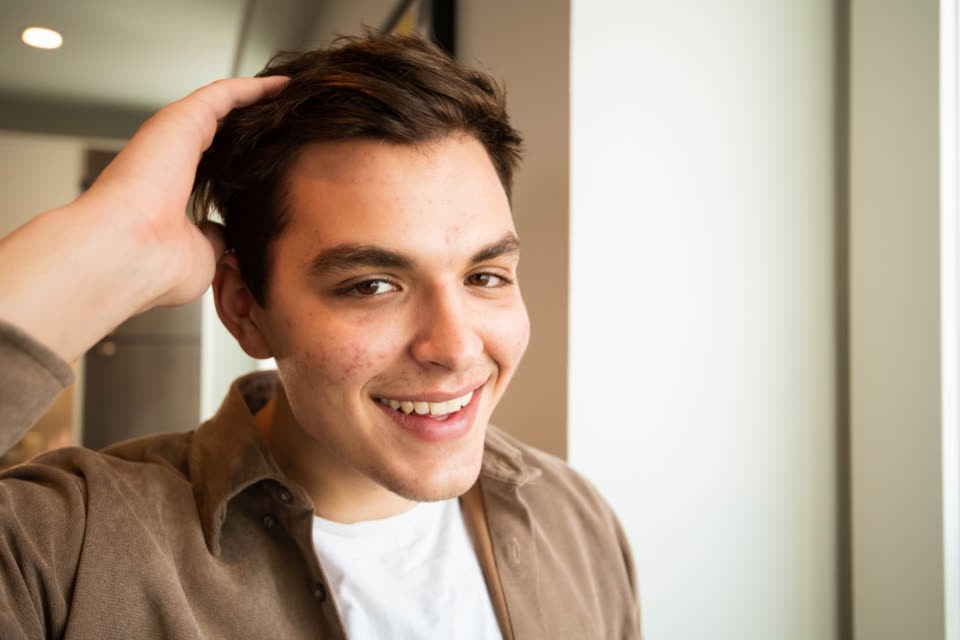 Before
A smiling man running a hand through his hair
The built-in Seedance 2.0 prompt, nothing written
Seedance 2.0 · 4 s
 Before
A golden retriever in falling snow
The built-in Seedance 2.0 prompt, nothing written
Seedance 2.0 · 4 s
 Before
A red umbrella on a rainy street at night
The built-in Seedance 2.0 prompt, nothing written
Seedance 2.0 · 4 s
Seedance 2.0 at a glance.
Stivio is a browser-based AI video generator that runs Seedance 2.0 for you: one photo in, an MP4 with sound out. The facts, in one place.
- Input
- One photo for each Seedance 2.0 video: PNG, JPEG or WebP, up to 10 MB. In the Studio you can also add an optional end frame.
- Output
- An MP4 of 4 to 15 seconds, in whole seconds, in the same shape as your photo: square, vertical or wide.
- Sound
- Seedance 2.0 can add AI sound to the clip. The button on this page turns it on; in the Studio it is a switch, and it costs no extra credits.
- Resolution
- 720p or 1080p. The one-click button makes a 4-second Seedance 2.0 clip at 720p, the cheapest setting this model has.
- Time
- Usually 1 to 5 minutes per clip; longer clips take longer. Failed renders are refunded automatically.
- Price
- Seedance 2.0 costs 5 credits per second at 720p and 11 at 1080p, so the 4-second button clip is 20 credits. One-time packs: $19 for 160 credits or $59 for 640, and credits never expire.
- Free trial
- New accounts get 12 free credits (one free trial per person). That is not enough for a Seedance 2.0 clip, but it covers a first video on Kling O3, MiniMax H3 or Seedance 2.5 at 480p.
- Where it runs
- In the cloud, through your browser, or from an AI client through our MCP server. Stivio is not the official Seedance 2.0 website and does not offer a download, a ComfyUI workflow or LoRA training.
How to use Seedance 2.0 in three steps.
You do not need a graphics card, a waitlist or an API key to try Seedance 2.0. One photo and a few minutes are enough.
- 01
Upload a photo
Pick a clear photo: a portrait, a pet, a street, a landscape, a product. Seedance 2.0 uses it as the first frame and keeps its shape, so a vertical photo gives a vertical video and a wide one gives a wide video.
- 02
Press Generate with Seedance 2.0
The motion and the sound are already described for you, so the box can stay empty. If you have a scene in mind, write one or two sentences: what moves, how the camera moves and what we should hear. The button always renders on Seedance 2.0, not on another model.
- 03
Download the MP4
Your Seedance 2.0 video is usually ready in 1 to 5 minutes. Save the MP4, or open the Studio to make it longer (up to 15 seconds), switch to 1080p, turn the sound off or add an end frame.
Seedance 2.0 image to video prompt tips.
Seedance 2.0 starts from your photo, so the photo does most of the work and the prompt describes what changes and what it sounds like. These habits make a cleaner clip.
Describe motion, not the picture
The model can already see the photo. A good Seedance 2.0 prompt says what happens next: "he laughs and looks to the side", "snow keeps falling on the dog's fur", "the camera slowly circles the car".
Name the sound you want
With sound on, say what we should hear: "rain on the umbrella", "a quiet café", "wind in the trees". If you want silence or your own music later, turn the sound switch off in the Studio.
Match the length to the action
A blink or a smile fits in 4 seconds. A walk across the frame or a slow reveal needs 8 to 12. Seedance 2.0 goes up to 15 seconds here, and every second costs credits.
Start from a sharp, well-lit photo
A face that fills a good part of the frame, with both eyes visible, gives the model more to work with. Tiny faces in a crowd and heavy blur are where video models start to guess.
Use the end frame for a planned change
In the Studio, Seedance 2.0 accepts a second image as the last frame. Upload a start photo and an end photo of the same scene and the model fills in the movement between them.
Test short, then go to 1080p
Try your idea as a 4-second 720p Seedance 2.0 clip first. When the motion is right, run the same photo and prompt again at 1080p or at a longer length for the version you keep.
What Seedance 2.0 clips are good for.
A Seedance 2.0 clip can run up to 15 seconds and carry its own sound, so it works in places where a silent loop falls flat.
Posts for Reels, TikTok and Shorts
Start from a vertical photo and you get a vertical video with sound that is ready to post. Add captions in your editing app if you need them.
Scenes with atmosphere
Rain, snow, a fire, a city street at night: places where the sound matters as much as the picture. Seedance 2.0 renders both in one pass from a single photo.
Sharper 1080p clips for less
At 1080p, Seedance 2.0 costs 11 credits per second against 16 for Seedance 2.5, so it is the cheaper way to get a full-HD Seedance clip with sound.
Comparing models on your own photo
If you are choosing between Seedance 2.0, Seedance 2.5 and Kling, run one of your own photos here first, then run the same photo on another model in the Studio, each run costing credits, and compare the clips yourself.
Seedance 2.0: your questions.
What people usually ask before they try Seedance 2.0 on Stivio.
What is Seedance 2.0?
Seedance 2.0 is an AI video model from ByteDance, the version before Seedance 2.5. You give it a photo and a short description of the motion, and it renders a video that starts from that photo, with AI sound if you want it. On Stivio it makes clips of 4 to 15 seconds at 720p or 1080p.
Is Seedance 2.0 free to use?
Not entirely. New accounts get 12 free credits (one free trial per person), but the cheapest Seedance 2.0 clip, 4 seconds at 720p, costs 20. You can spend the free credits on a first video with another model, such as Kling O3 or Seedance 2.5 at 480p, and buy a one-time pack when you want Seedance 2.0. Free videos carry a stivio.ai watermark across the middle of the frame; any purchase removes it from every later video.
Is there unlimited free Seedance 2.0?
Not on Stivio. Every video costs credits, because every render costs us money upstream. You pay per second of video, and credits from one-time packs never expire.
Is this the official Seedance 2.0 website?
No. Seedance 2.0 is made by ByteDance. Stivio is an independent site that runs the model for you in the browser, next to five other video models, and charges in its own credits.
How do I use Seedance 2.0 image to video?
Upload a photo on this page and press Generate with Seedance 2.0. The motion and sound prompt is built in, so you do not have to write anything. The video is usually ready in 1 to 5 minutes. Sign-in with Google or Apple is required.
How much does Seedance 2.0 cost?
On Stivio it costs 5 credits per second at 720p and 11 at 1080p, and sound costs nothing extra. The 4-second 720p clip is 20 credits: about $2.38 with the $19 pack of 160 credits, or about $1.84 with the $59 pack of 640. A 5-second 1080p clip is 55 credits. The Studio shows the cost of every setting.
Seedance 2.0 vs 2.5: which should I use?
Seedance 2.5 is the newer model and makes clips up to 30 seconds, with a cheap 480p tier at 3 credits per second. Seedance 2.0 stops at 15 seconds and starts at 720p, but costs less at the higher settings: 5 credits per second at 720p against 6, and 11 at 1080p against 16. Both add sound at no extra cost. The honest test is to run the same photo on both and compare.
Does Seedance 2.0 make sound?
Yes. Seedance 2.0 can generate sound together with the picture, such as rain, wind, footsteps or a busy room. The button on this page turns it on. In the Studio it is a switch, and turning it on does not change the price. The example clips on this page play muted; the MP4 you download has the sound.
How long can a Seedance 2.0 video be?
From 4 to 15 seconds, in whole seconds. The button on this page makes a 4-second clip; open the Studio to pick another length. For longer single shots, Seedance 2.5 on Stivio goes up to 30 seconds.
Does Seedance 2.0 support 480p or 4K?
Neither, on Stivio. Seedance 2.0 runs at 720p (5 credits per second) or 1080p (11 credits per second). If you want a cheaper 480p test clip, Seedance 2.5 offers 480p at 3 credits per second.
Can I use Seedance 2.0 Fast or Mini here?
No. Stivio runs the standard Seedance 2.0 model and the newer Seedance 2.5. There is no Fast or Mini version in our model list today.
Can Seedance 2.0 make a video from text only?
Not in the Studio, which always starts from a photo. Through our MCP server, an AI client can start a Seedance 2.0 video from text alone and choose 16:9, 9:16, 1:1, 4:3, 3:4 or 21:9, at the same per-second prices. The button on this page always starts from a photo.
Is there a Seedance 2.0 API?
Stivio has an MCP server: create a personal key on our MCP page and an AI client such as Claude can list the models, pick Seedance 2.0, upload a photo and start a video, paid from the same credits. It is not a bulk developer API; if you need batch jobs at scale, a developer platform fits better.
Do I need ComfyUI or a GPU to run Seedance 2.0?
Not here. Seedance 2.0 runs in the cloud through Stivio and you only need a browser. Stivio does not provide a ComfyUI workflow, nodes, a GitHub project, a model download or a local install.
Is there a Seedance 2.0 image to video prompt guide?
The short version: describe the motion and the sound, not the picture, and keep it to one main action and one camera move. For example, "She smiles and looks up, slow push-in, soft rain". The tips section above goes through this step by step.
Can Seedance 2.0 use a first frame and a last frame?
Yes, in the Studio. Your photo is always the first frame, and you can upload a second image as the end frame. The model then animates from one to the other. The one-click button on this page uses a single photo.
Can I choose the aspect ratio in Seedance 2.0?
When you start from a photo, the video always follows it: a square photo gives a square clip, a 9:16 photo gives a vertical clip and a 16:9 photo gives a wide one. Crop the photo before you upload if you need another shape.
What is the best way to try Seedance 2.0 online?
It depends on what you need. If you want to see what Seedance 2.0 does with your own photo, without installing anything or joining a waitlist, this page does it with one upload and one button, and the Studio lets you run the same photo on five other models. If you need reference videos, audio uploads or bulk jobs, a developer platform or the model maker's own app fits better.
Can I get Seedance 2.0 videos with no watermark?
Yes. Only free trial videos carry a stivio.ai watermark across the middle of the frame. After any purchase, a one-time pack or a plan, every new video you make is clean, including every Seedance 2.0 clip.
Can I use Seedance 2.0 videos commercially?
Yes. Our Terms allow personal and commercial use of the videos you make, and paid videos carry no watermark. Stivio does not review or clear the result for you, so check each video and its sound before you publish it, and only upload photos you own or have permission to use, especially photos of other people.
Are my photos kept private?
They are never listed publicly. Videos are unlisted: only people you send the link to can open them, and they are kept out of search engines. Stivio never uses your uploads to train its own models and never sells them or shares them for advertising. Your photo goes only to the services that check, render and store it, listed in Privacy Policy section 7. Anyone you send a video link to can also see the original photo.
More ways to make videos from photos
Seedance 2.0 without the waitlist.
Upload a photo, press one button and get your Seedance 2.0 video with sound in a few minutes. Sign in with Google or Apple and pay only for the seconds you render.