MiniMax H3 in your browser, one click.
Upload a photo, press one button and MiniMax H3 turns it into a 5-second video. There is nothing to install and no workflow to build. Writing is optional: our built-in MiniMax H3 prompt asks for natural movement and a slow camera push-in, and tells the model to keep faces, objects and the background unchanged.
Sign in with Google or Apple and your MiniMax H3 video starts rendering as soon as your account has the 10 credits it costs. Your first video is free.
MiniMax H3 in one click · First video free · Failed runs refunded
MiniMax H3 examples, one click each.
Every clip here was rendered by MiniMax H3 on this site. We uploaded each photo and pressed the button with the built-in prompt: nothing written, no editing, no second try. The model and length sit under each clip.
 Before
A close portrait of a smiling woman outdoors
The built-in MiniMax H3 prompt, nothing written
MiniMax H3 · 5 s
 Before
A golden retriever in falling snow
The built-in MiniMax H3 prompt, nothing written
MiniMax H3 · 5 s
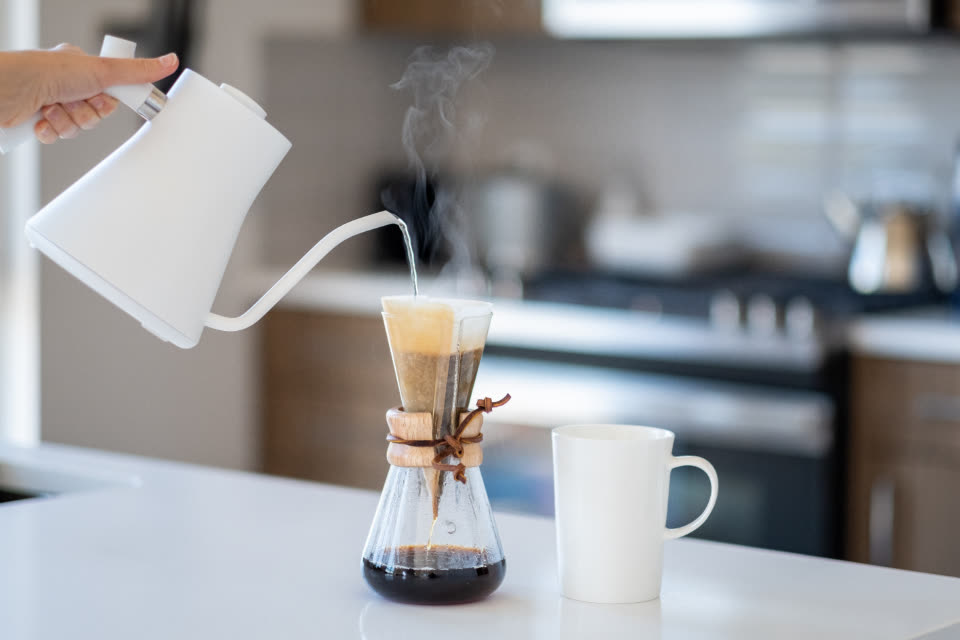 Before
A kettle pouring water into a pour-over coffee maker
The built-in MiniMax H3 prompt, nothing written
MiniMax H3 · 5 s
MiniMax H3 at a glance.
Stivio is a browser-based AI video generator that runs MiniMax H3 for you: one photo in, a short MP4 out. The facts, in one place.
- Input
- One photo for each MiniMax H3 video: PNG, JPEG or WebP, up to 10 MB. In the Studio you can also add an optional end frame.
- Output
- An MP4 of 4 to 15 seconds, in whole seconds, in the same shape as your photo: square, vertical or wide. MiniMax H3 clips have no sound.
- Resolution
- 768P or 2K. The one-click button on this page makes a 5-second MiniMax H3 clip at 768P.
- Motion
- Built in on this page: natural movement and a slow push-in. Or write your own MiniMax H3 prompt in the optional box.
- Time
- Usually 1 to 5 minutes per clip. Failed renders are refunded automatically.
- Price
- MiniMax H3 costs 2 credits per second at 768P and 3 at 2K, so a 5-second 768P clip is 10 credits. One-time packs: $19 for 160 credits or $59 for 640, and credits never expire.
- Free trial
- New accounts get 12 free credits (one free trial per person), enough for one MiniMax H3 clip of up to 6 seconds at 768P, with a watermark.
- Where it runs
- On our servers, through your browser, or from an AI client through our MCP server. Stivio does not offer a MiniMax H3 download, a ComfyUI workflow or LoRA training.
How to use MiniMax H3 in three steps.
You do not need a graphics card, a node graph or an API key to try MiniMax H3. One photo and a couple of minutes are enough.
- 01
Upload a photo
Pick a clear photo: a portrait, a pet, a product, a place. MiniMax H3 uses it as the first frame and keeps its shape, so a vertical photo gives a vertical video and a wide one gives a wide video.
- 02
Press Generate with MiniMax H3
The motion is already written for you, so the box can stay empty. If you have a scene in mind, type one sentence: what moves, and how the camera moves. The button always renders on MiniMax H3, not on another model.
- 03
Download the MP4
Your MiniMax H3 video is usually ready in 1 to 5 minutes. Save the MP4, or open the Studio to change the length from 4 to 15 seconds, switch to 2K or add an end frame.
MiniMax H3 prompt tips that help.
MiniMax H3 starts from your photo, so the photo does most of the work and the prompt only has to describe the change. These habits make a cleaner clip.
Describe motion, not the picture
The model can already see the photo. A good MiniMax H3 prompt says what happens next: "she smiles and turns to the camera", "steam rises from the cup", "the camera slowly circles the car".
One action and one camera move
Keep your own direction simple. Give MiniMax H3 one thing for the subject to do and one camera move. Several actions rarely fit in five seconds.
Start from a sharp, well-lit photo
A face that fills a good part of the frame, with both eyes visible, gives the model more to work with. Tiny faces in a crowd and heavy blur are where video models start to guess.
Use the end frame for a planned change
In the Studio, MiniMax H3 accepts a second image as the last frame. Upload a start photo and an end photo of the same scene and the model fills in the movement between them.
Match the length to the action
A blink or a smile fits in 4 or 5 seconds. A walk across the frame or a slow reveal needs 8 to 10. MiniMax H3 goes up to 15 seconds here, and every extra second costs credits.
Compare it with a second model
No model wins on every photo. If a MiniMax H3 take bends a hand or changes a face, run the same photo on Kling O3 or Seedance in the Studio and keep the better clip.
What MiniMax H3 clips are good for.
A MiniMax H3 clip is a few seconds long and has no sound, so it fits wherever a short, silent video does. A few places it fits well.
Portraits that move
Turn a portrait or a selfie into a short clip with a blink, a smile or a turn of the head. In our Studio we list MiniMax H3 for expressive characters and faces.
Posts for Reels, TikTok and Shorts
Start from a vertical photo and you get a vertical video that is ready to post. Add music or captions in your editing app afterwards, because the clip itself is silent.
Shots for a longer edit
Make several MiniMax H3 clips from different photos and cut them together in your own editor. The end frame option helps one shot finish where the next one begins.
Testing the model before you commit
If you are deciding whether MiniMax H3 suits your project, run one of your own photos here first. You can then run the same photo on any of the five other models in the Studio, each run costing credits, and compare the clips yourself.
MiniMax H3: your questions.
What people usually ask before they try MiniMax H3 on Stivio.
What is MiniMax H3?
MiniMax H3, shown as Hailuo-03 in our model list, is an AI video model. You give it a photo and a short description of the motion, and it renders a video that starts from that photo. On Stivio it makes clips of 4 to 15 seconds at 768P or 2K, without sound.
Is MiniMax H3 free to use?
You can try it for free. New accounts get 12 free credits (one free trial per person), and a 5-second MiniMax H3 clip at 768P costs 10. Free videos carry a stivio.ai watermark across the middle of the frame; any paid plan or one-time pack removes it from every later video.
How do I use MiniMax H3 image to video?
Upload a photo on this page and press Generate with MiniMax H3. The motion prompt is built in, so you do not have to write anything. The video is usually ready in 1 to 5 minutes. Sign-in with Google or Apple is required.
How much does MiniMax H3 cost?
On Stivio it costs 2 credits per second at 768P and 3 credits per second at 2K. A 5-second 768P clip is 10 credits: about $1.19 with the $19 pack of 160 credits, or about $0.92 with the $59 pack of 640. Pack credits never expire, and the Studio shows the cost of every setting.
Do I need ComfyUI or a GPU to run MiniMax H3?
Not here. This page runs MiniMax H3 on our servers and you only need a browser. Stivio does not provide a ComfyUI workflow, nodes, a model download or a local install; if you want to run a model on your own machine, this is not the right tool.
Can I use LoRAs with MiniMax H3 on Stivio?
No. Stivio runs the standard model with your photo and your prompt. It does not load LoRAs, custom checkpoints or other add-ons.
How long can a MiniMax H3 video be?
From 4 to 15 seconds, in whole seconds. The button on this page makes a 5-second clip; open the Studio to pick another length. If you need up to 30 seconds in one clip, Seedance 2.5 in the same Studio goes that far.
What resolution does MiniMax H3 output?
768P or 2K. The one-click button uses 768P because it is the cheaper tier and fits inside the free credits. Switch to 2K in the Studio for a sharper clip at 3 credits per second.
Does MiniMax H3 make sound?
No. MiniMax H3 clips on Stivio are silent. If you want AI sound in the clip, Kling O3, Kling 2.6 and the Seedance models have a sound switch in the Studio, and Wan 2.6 always includes it. You can also add music in your own editor.
Is there a MiniMax H3 prompt guide?
The short version: describe the motion, not the picture, and keep it to one action and one camera move. For example, "He laughs and looks to the left, slow push-in". The tips section above goes through this step by step.
Can MiniMax H3 use a first frame and a last frame?
Yes, in the Studio. Your photo is always the first frame, and you can upload a second image as the end frame. The model then animates from one to the other. The one-click button on this page uses a single photo.
What is the best way to try MiniMax H3 online?
It depends on what you need. If you want to see what MiniMax H3 does with your own photo, without installing anything, this page does it with one upload and one button, and the Studio lets you run the same photo on five other models. To drive it from an AI client, Stivio has an MCP server with personal keys. If you need bulk batch jobs or full control of a local pipeline, a developer platform or your own setup fits better.
Is MiniMax H3 better than Kling or Seedance?
It depends on the photo. On Stivio, MiniMax H3 and Kling O3 cost the same at their base tier, 2 credits per second. Kling O3 and the Seedance models can add sound and MiniMax H3 cannot; Seedance 2.5 makes longer clips. The honest test is to run the same photo on two models and compare.
Can I get MiniMax H3 videos with no watermark?
Yes. Free trial videos carry a stivio.ai watermark across the middle of the frame. After any purchase, a one-time pack or a plan, every new video you make is clean.
Can I use MiniMax H3 videos commercially?
Yes. Our Terms allow personal and commercial use of the videos you make, and paid videos carry no watermark. Stivio does not review or clear the result for you, so check each video before you publish it, and only upload photos you own or have permission to use, especially photos of other people.
Does the video keep my photo's shape?
Yes. Image to video follows the photo: a square photo gives a square clip, a 9:16 photo gives a vertical clip and a 16:9 photo gives a wide one. Crop the photo before you upload if you need a different shape.
Are my photos kept private?
They are never listed publicly. Videos are unlisted: only people you send the link to can open them, and they are kept out of search engines. Stivio never uses your uploads to train its own models and never sells them or shares them for advertising. Your photo goes only to the services that check, render and store it, listed in Privacy Policy section 7. Anyone you send a video link to can also see the original photo.
More ways to make videos from photos
MiniMax H3 without the setup.
Upload a photo, press one button and get your MiniMax H3 video in a few minutes. Sign in with Google or Apple, first video free, no card needed.