Product image to video in one click, ready for your listing and ads.
Upload the packshot you already sell with and press one button. Writing is optional: our built-in product image to video motion adds a slow camera move and soft studio light, keeps your label and logo as they are, and hands you an MP4 a few minutes later.
Sign in with Google or Apple and your video starts rendering right away. Your first video is free.
Product image to video in one click · First video free · Failed runs refunded
Product image to video examples, one click each.
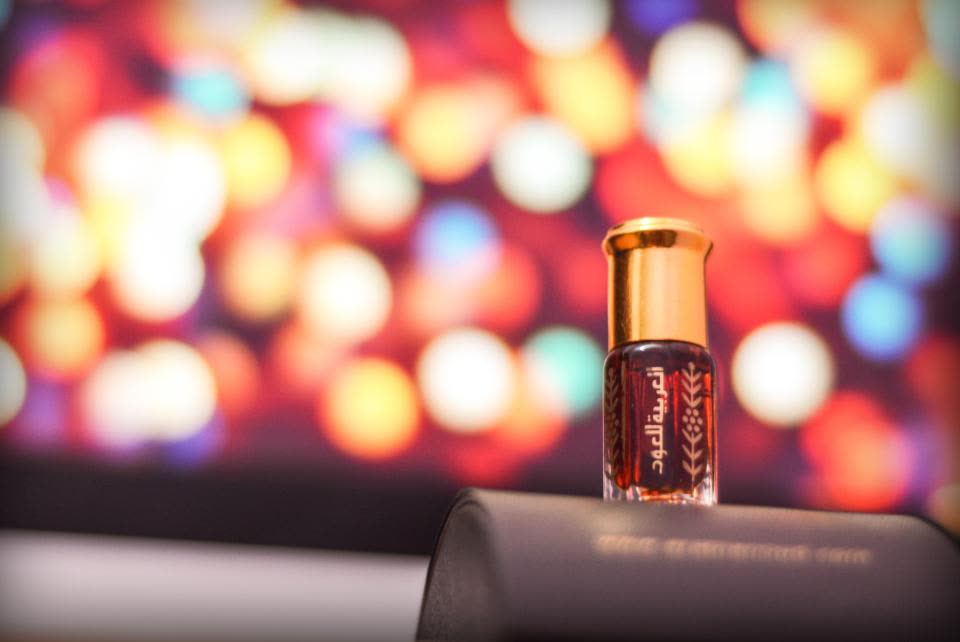
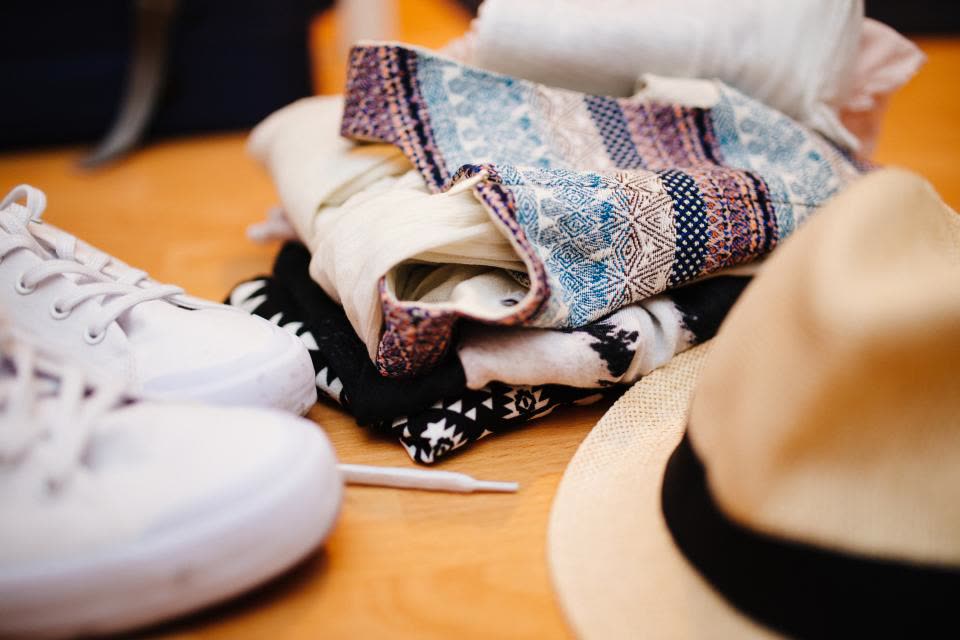
Each product image to video clip began as an ordinary product photo. For every product image to video example here we used the button above and nothing else: no prompt, no editing, no second try. The model and length sit under each clip.
 Before
A small perfume oil bottle against coloured bokeh lights
The built-in product image to video motion, nothing written
Kling O3 · 5 s
 Before
White canvas sneakers in a flat lay with clothes and a hat
The built-in product image to video motion, nothing written
Kling O3 · 5 s
 Before
A white coffee cup and star cookies in window light
The built-in product image to video motion, nothing written
Kling O3 · 5 s
Product image to video at a glance.
Stivio is a browser-based AI product image to video generator: one product photo in, a short MP4 clip out. The facts, in one place.
- Input
- One product photo for each product image to video clip: PNG, JPEG or WebP, up to 10 MB.
- Output
- An MP4 of 3 to 30 seconds, depending on the model, in the same shape as your photo: vertical, square or wide.
- Motion
- Built in for products: a slow camera move with soft studio light. Or describe your own product image to video motion.
- Models
- Kling O3, Seedance 2.5, Seedance 2.0, Wan 2.6, MiniMax H3 and Kling 2.6. The one-click button makes a 5-second Kling O3 clip at 720p.
- Time
- Usually 1 to 5 minutes per product image to video render. Failed renders are refunded automatically.
- Price
- A 5-second Kling O3 720p clip costs 10 credits. One-time packs: $19 for 160 credits or $59 for 640, and credits never expire.
- Free trial
- New accounts get 12 free credits (one free trial per person), enough for one product image to video clip with a watermark.
- Rights
- After any purchase, videos have no watermark and come with commercial use rights for stores and ads.
How to turn a product image to video in three steps.
To turn a product image to video you need one clear photo and a couple of minutes. No studio, no lighting kit and no editing software: a product image to video render starts from the picture you already have.
- 01
Upload your best product shot
Any product image to video upload works: a packshot, a flat lay or a lifestyle picture. PNG, JPEG or WebP up to 10 MB. The video keeps the photo's shape, so a vertical photo gives a vertical clip.
- 02
Press Make my product video
The product image to video motion is already written for you: a slow camera move and soft moving light. Want something specific, like steam rising from the cup? Type it in the optional box.
- 03
Download the MP4 and post it
Your product image to video clip is usually ready in 1 to 5 minutes. Save the MP4 and upload it to your product page, your Reels, your TikTok Shop listing or your ad manager.
Tips for a better product image to video result.
The AI works from your photo, so a good photo does most of the work. These habits help every product image to video clip.
Start with a sharp, well-lit photo
A crisp packshot gives the cleanest product image to video result. Blurry or dark photos make the AI guess, and guessing is where labels start to wobble.
Crop to the shape you will post
Every model follows your photo's shape. Crop to 9:16 for Reels, Shorts and TikTok, 1:1 for feed posts, or 16:9 for a website banner before you turn the product image to video.
Keep small text large enough to read
Big logos and bold labels hold up well. Tiny print on a small bottle can soften as the camera moves, so frame the product close when its label matters. If the label is the hero, make it big in your product image to video upload.
Short and calm sells better
For a product image to video clip, five calm seconds usually look more premium than a long, busy take. Loop it on a product page, or cut several short clips into one ad.
Shoot more than one angle
A front shot, a side shot and a close-up give you three different product image to video clips of the same item. Use them together in one ad, or test them against each other.
Describe one motion at a time
If you write your own product image to video prompt, ask for one clear action: "the lid opens", "steam rises", "the watch turns slowly". One action renders more cleanly than three.
Where sellers use a product image to video clip.
A moving product stops the scroll. Most people who turn a product image to video here use the product image to video clip in one of these places.
Product pages
Add a product image to video clip next to your photos on Shopify, Etsy, Amazon or your own store. A product image to video clip shows depth, shine and texture that a still photo can't.
Social posts and Reels
Turn a product image to video for Instagram Reels, TikTok and YouTube Shorts. Crop the photo to 9:16 first and the product image to video clip is ready to post.
Paid ads
Test more creatives without a shoot: make a product image to video clip from each angle you already have, then let the ad platform find the winner. Paid plans include commercial rights.
Launch pages and newsletters
Put a product image to video clip at the top of a launch page, or link to it from your newsletter. Movement above the fold keeps visitors reading, and a product image to video clip costs far less than a filmed teaser.
Product image to video: your questions.
What sellers usually ask before they turn a product image to video with Stivio.
How do I turn a product image to video with AI?
Upload a clear photo of your product on this page and press Make my product video. The motion is built in, so you don't have to write anything. The AI renders a short MP4 in about 1 to 5 minutes. Sign-in with Google or Apple is required.
Can I make a product image to video for free?
Yes. New accounts get 12 free credits (one free trial per person), enough for your first video. Free videos carry a stivio.ai watermark across the middle of the frame; any paid plan or one-time pack removes it from every later video.
What is the best AI tool to turn a product image to video?
It depends on what you need. If you want a short, clean clip from the packshot you already have, without writing prompts or editing, Stivio does that in one click and lets you switch between six video models in the Studio. If you need talking avatars, voice-overs or ad templates with text and prices, a dedicated ad-creative tool fits better: Stivio does not add presenters, text or music.
How much does a product image to video cost?
A 5-second Kling O3 clip at 720p costs 10 credits. With the one-time packs ($19 for 160 credits, $59 for 640) that is about $1.19 or $0.92 per clip, and the credits never expire. Longer clips, higher resolutions and other models cost more per second; the Studio shows the cost of every setting. Your first clip is free.
Which AI model is best for product image to video?
Kling O3 is a strong all-rounder with crisp motion and one of the lowest prices per second, which is why our examples use it. Seedance 2.5 handles longer clips, up to 30 seconds, and can add sound. Wan 2.6 always includes native audio. If a label matters, try the same photo on two models and keep the better one.
Will my logo and label stay the same?
Your photo is the first frame and the built-in motion tells the AI to keep the shape, colours, logo and label text unchanged. Large logos usually hold up well; very small print can soften while the camera moves. If a render fails, your credits come back automatically.
Do I have to write a prompt for a product image to video?
No. This page uses a built-in motion made for products: a slow camera move with soft, moving studio light. If you want something specific, such as fizz in a glass or a turning watch face, type it in the optional box.
Can I make vertical videos for TikTok and Reels?
Yes. The video follows your photo's shape, so crop the photo to 9:16 before uploading and you get a vertical clip. A square photo gives a square clip, a wide photo a wide one.
Can I use a product image to video clip on Amazon, Etsy or Shopify?
Yes. You get a standard MP4 file that you can upload anywhere that accepts product video. Each marketplace has its own rules for video length, file size and content, so check them before you upload. Paid videos carry no watermark and include commercial rights.
Is there a product image to video AI with no watermark?
Yes. Free trial videos carry a stivio.ai watermark across the middle of the frame. After any purchase, a one-time pack or a plan, every new video you make is clean.
Can I use the videos in ads and on my store?
Yes. Paid plans include personal and commercial use rights with no watermark, so the clips can go on product pages, marketplaces and paid ads.
How long are the videos, and what do they cost?
You can choose 3 to 30 seconds depending on the model; for products five seconds is usually enough. Credits are charged per second. The one-click button makes a 5-second Kling O3 clip at 720p; in the Studio you can pick another model and length and see the cost before you render.
Does Stivio remove backgrounds or add text and music?
No. Stivio animates the photo as you upload it. Remove or change the background with another tool first, and add captions, prices or music in your video editor afterwards. Some models can add ambient sound; you can turn it on or off in the Studio.
What kinds of products work best?
Solid objects with a clear shape work best: bottles, jars, shoes, bags, watches, mugs, gadgets and boxed goods. Clothing on a hanger or a model works too. Very reflective or transparent items are harder for any AI.
Can I use a photo with a person holding the product?
Yes. The built-in motion avoids adding new people or hands, but people already in the photo can move naturally. Describe the motion you want in the optional box for the best result.
How long does a product image to video take?
Usually 1 to 5 minutes per video. You can keep the page open to watch it land, or find it later in your history.
Are my product photos private?
They are never listed publicly. Videos are unlisted: only people you send the link to can open them, and they are kept out of search engines. Stivio never uses your uploads to train its own models and never sells them or shares them for advertising. Your photo goes only to the services that check and render it, listed in Privacy Policy section 7.
More ways to make videos from photos
Product image to video without booking a shoot.
Turn a product image to video in one click and get your product image to video clip in a few minutes. Sign in with Google or Apple, first video free, no card needed.