Animate old photos and see the faces you miss smile again.
Upload a scan or a phone snap of a family picture and press one button. Writing is optional: by default we animate old photos with a soft blink, a quiet breath and a small smile, and hand you a short video a few minutes later. Old photo to video, no editing skills needed.
Sign in with Google or Apple and your video starts rendering right away. Your first video is free.
Animate old photos in one click · First video free · Failed runs refunded
See how we animate old photos, one click each.
Each clip began as a scanned print from a public archive. To animate old photos like these we used the button above and nothing else: no prompt, no editing, no second try. The model and length sit under each clip.
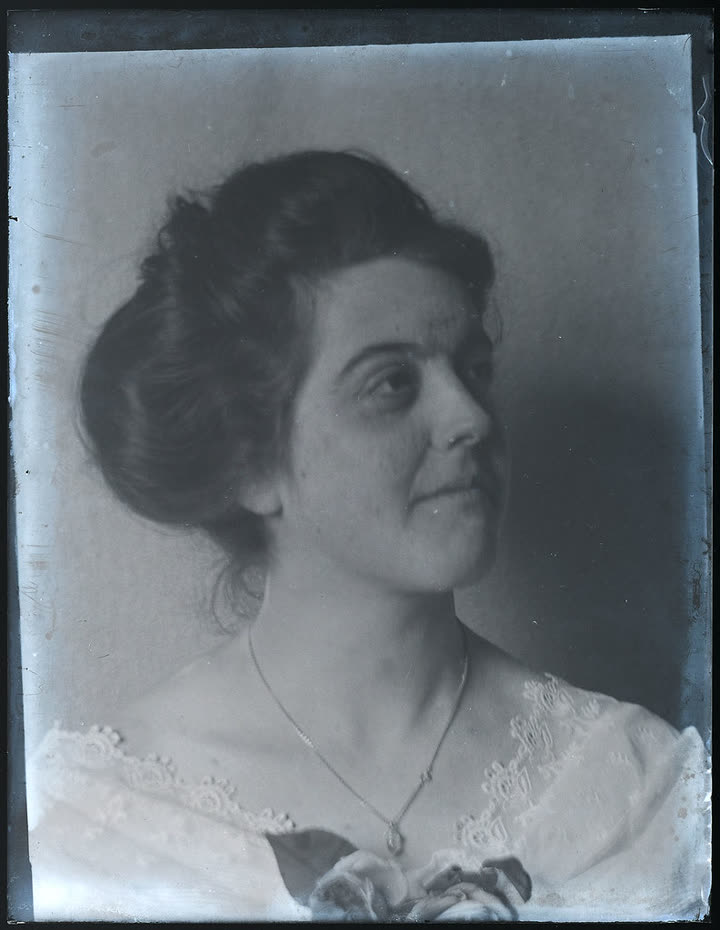 Before
A young woman's studio portrait, early 1900s
The built-in animate old photos motion, nothing written
Kling O3 · 5 s
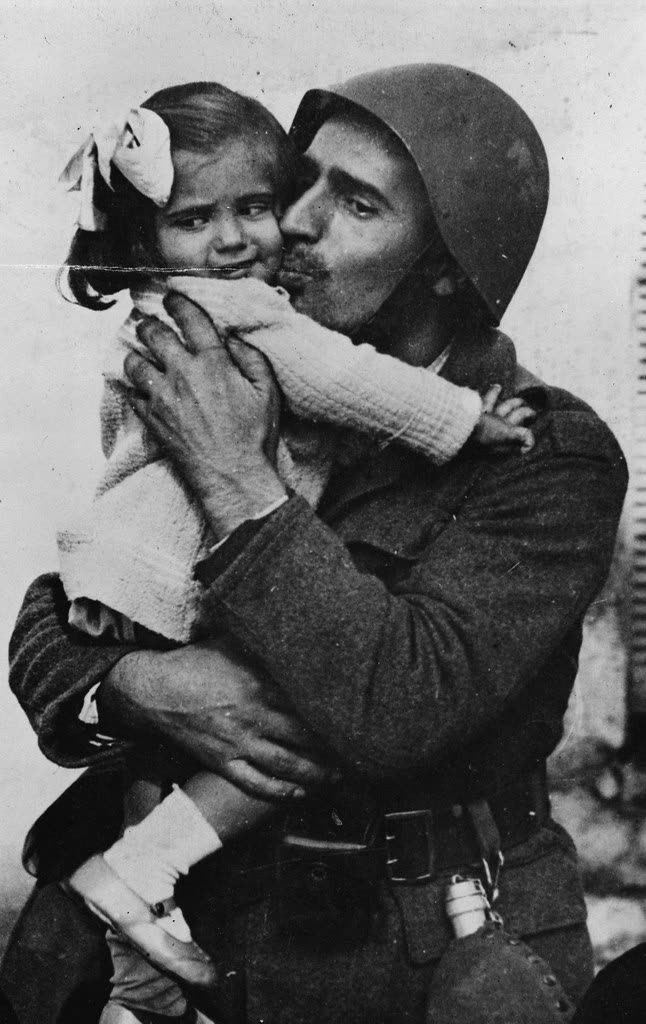 Before
A soldier hugging his little daughter, 1940s
The built-in animate old photos motion, nothing written
Kling O3 · 5 s
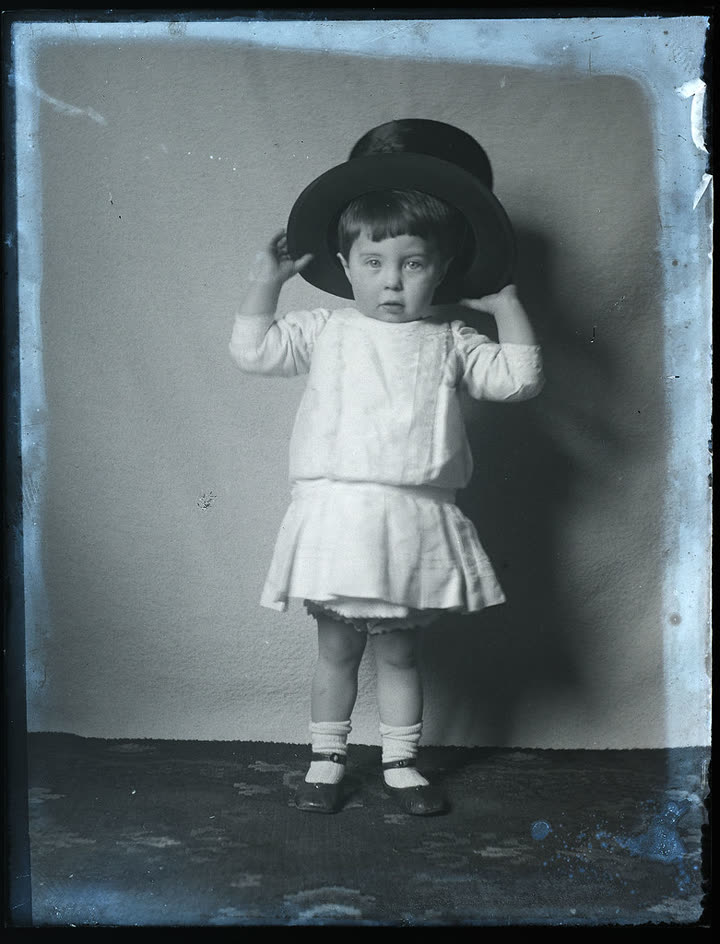 Before
A small boy and a very big top hat, early 1900s
The built-in animate old photos motion, nothing written
Kling O3 · 5 s
Animate old photos at a glance.
Stivio is a browser-based AI tool to animate old photos: one scanned picture in, a short video of it coming to life out. The facts, in one place.
- Input
- A scan or a phone photo of the print: PNG, JPEG or WebP, up to 10 MB.
- Output
- An MP4 of 3 to 30 seconds, depending on the model. Black and white and sepia pictures keep their look.
- Motion
- Built in to animate old photos gently: a blink, a soft breath, a small smile. Or describe your own.
- Not included
- Stivio does not restore, repair or colorize. We animate old photos exactly as you upload them.
- Time
- Usually 1 to 5 minutes per video. Failed renders are refunded automatically.
- Price
- A 5-second Kling O3 720p clip costs 10 credits. One-time packs: $19 for 160 credits or $59 for 640, and credits never expire.
- Free trial
- New accounts get 12 free credits (one free trial per person), enough to animate old photos once, with a watermark.
- Where
- Any modern browser on a phone or a computer. No app to install.
How to animate old photos in three steps.
To animate old photos you need the picture and a couple of minutes. That's all it takes to turn an old photo to video.
- 01
Scan it, or snap it with your phone
Lay the print flat by a window, hold the phone straight above it and avoid glare. A scanner is even better. To animate old photos we take PNG, JPEG or WebP up to 10 MB.
- 02
Press Animate my photo
The motion we use to animate old photos is already written for you. Have something special in mind, like Dad turning to wink? Type it in the optional box.
- 03
Watch, download, share
The video is usually ready in 1 to 5 minutes. Watch it in your browser, save the MP4, or send the link to the family group chat. Many people animate old photos in batches, one print after another, while the shoebox is still open on the table.
Tips that help when you animate old photos.
The AI can only work with what the picture holds. A few small things make a real difference when you animate old photos.
Let the faces fill the frame
Clear faces matter most when you animate old photos. If the people are tiny in a big group shot, crop closer before you upload.
Use the sharpest copy you have
Higher-resolution scans keep the detail in eyes and hair. Scratches and tears stay in the video, because we animate old photos as they are: Stivio does not restore or repair them.
Black and white stays black and white
Sepia and monochrome pictures keep their look. If you would like colour, colorize the picture with a restoration tool first, then animate the colour version here. Either way, we animate old photos in the colours you upload.
Gentle is more lifelike
When you animate old photos, a five-second clip with a blink and a smile feels more real than a long clip full of movement. Once you love the first one, try a longer take.
Why families turn an old photo to video.
Almost everyone who comes here to animate old photos is holding a picture of someone they love.
To say goodbye
Animate old photos of a parent or grandparent and see them smile again, for a memorial or for the people who knew them best.
To surprise the family
Animate old photos for a birthday, an anniversary or a reunion: the wedding portrait, the first house, the kids on the beach in 1986.
To meet the ancestors
Animate old photos from your family tree, put a little life into faces you only know from stories, and send the clips to the cousins doing the research with you.
To get the kids asking questions
Animate old photos for a school project or a family history evening. Children who scroll straight past a still portrait will stop when a great-grandparent blinks and smiles, and then they want to know who that was. When you animate old photos, the stories start coming out.
Animate old photos: your questions.
What people usually ask before they animate old photos with Stivio.
How do I animate old photos with AI?
Scan the picture or take a straight-on phone photo of it, upload it on this page and press Animate my photo. The motion is built in, so you don't have to write anything. The AI renders a short MP4 in about 1 to 5 minutes. Sign-in with Google or Apple is required.
Can I animate old photos for free?
Yes. New accounts get 12 free credits (one free trial per person), enough for your first video. Free videos carry a stivio.ai watermark across the middle of the frame; any paid plan or one-time pack removes it from every later video.
What is the best app to animate old photos?
If you want a natural blink and smile without installing anything, Stivio works in the browser, needs no prompt and lets you describe your own motion when you want more. Some family-tree services also animate photos inside their own apps; they can suit you if your pictures already live there. Try your first video here for free and compare.
How much does it cost to animate old photos?
Your first video is free. After that, a 5-second Kling O3 clip at 720p costs 10 credits: about $1.19 with the $19 pack (160 credits) or $0.92 with the $59 pack (640 credits). Credits never expire, and longer or higher-resolution clips cost more per second.
Can I animate old photos without downloading an app?
Yes. Everything runs in your web browser on a phone, tablet or computer. Upload the picture, press Animate my photo and download the MP4 when it is ready.
Do I have to write a prompt to animate old photos?
No. This page uses a built-in motion made for old pictures: a natural blink, a soft breath and a small smile, with the camera still. If you have something specific in mind, type it in the optional box next to the photo.
Will the faces still look like my family?
Your photo is the first frame and the motion is deliberately small, so faces usually stay recognisable, especially with clear scans. Tiny or blurry faces are harder. If a video fails to render, your credits come back automatically.
Can Stivio restore or colorize my old photos?
No. Stivio animates the photo exactly as you upload it, so scratches, fading and black and white stay in the video. Restore or colorize the picture with another tool first if you want that look.
How long are the videos, and what do they cost?
You can choose 3 to 30 seconds depending on the model; for old photos five seconds is usually just right. Credits are charged per second. The one-click button makes a 5-second Kling O3 clip at 720p; in the Studio you can pick another model and length and see the cost before you render.
Can I turn an old photo to video on my phone?
Yes. The page works in any modern phone browser: take a photo of the print, upload it and press Animate my photo. The finished MP4 saves straight to your phone.
Can I animate old photos with several people in them?
Yes. Everyone in the picture can move, but larger faces animate more convincingly. For big group shots, crop to a few people first.
Can I animate old photos of places or pets?
Yes. With no people in the frame, the built-in motion adds gentle movement like leaves, water or light. Pets get a soft, natural movement too.
How long does it take to animate old photos?
Usually 1 to 5 minutes per video. You can keep the page open to watch it land, or find it later in your history.
Can I use the videos when I animate old photos for a memorial or a post?
Yes, the videos are yours to share with family and friends. Paid plans include commercial use rights and remove the watermark.
What if I don't like the result when I animate old photos?
Try again with a sharper scan, a closer crop or your own short description of the motion. If a render fails outright, the credits are refunded automatically.
Are my family photos private?
They are never listed publicly. Videos are unlisted: only people you send the link to can open them, and they are kept out of search engines. Stivio never uses your uploads to train its own models and never sells them or shares them for advertising. Your photo goes only to the services that check and render it, listed in Privacy Policy section 7.
More ways to make videos from photos
Animate old photos while the stories are still being told.
Animate old photos in one click and get the video in a few minutes. Sign in with Google or Apple, first video free, no card needed.